
Mobile Metronome Pro - Get APK
You'll be able to download in few seconds.
Publisher Description
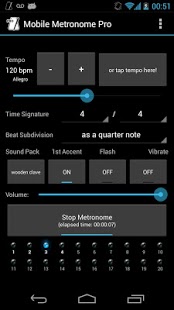
The accurate and best evaluated metronome on Android Market now in an ads-free package!
For a really small price you get a professional metronome on your smartphone with every feature you could ask for plus a lot more!
List of features:
- Ads-free!
- Fine tempo tuning from 10 to 230 BPM
- Italian tempo markings
- Load and save presets
- Tap tempo
- Adjustable tempo signature for simple, compound and complex meters.
- From 2 to 20 beats per measure
- Beat subdivision as quarter, eighth, triplet, sixteenth, quintuplet and sextuplet notes
- Beat emphasis
- 4 soundpacks
- Adjustable volume
- Visual reference
- Visual feedback
- Haptic feedback (vibration)
- Automatically turns off when there´s an incoming call
- Runs in background
- Settings are saved automatically on exit
and more!
About License Issues:
If you are facing license issues please update Mobile Metronome Pro, clear Google Play app data (not cache) and try again. There are comments on the internet about this issue, affecting many apps. sorry for the inconvenience!
About permissions:
- READ PHONE STATE allows Mobile Metronome Pro to stop automatically when there's an incoming call.
- VIBRATE is required for the vibration feature
- WAKE LOCK garantees the metronome won't stop after screen goes off
Incompatibility reports:
-HTC wildfire: misplacement of toggle buttons on the screen
About Mobile Metronome Pro
The company that develops Mobile Metronome Pro is Gabriel Simões. The latest version released by its developer is 1.0 .
To install Mobile Metronome Pro on your Android device, just click the green Continue To App button above to start the installation process. The app is listed on our website since 2012-12-13 and was downloaded 0 times. We have already checked if the download link is safe, however for your own protection we recommend that you scan the downloaded app with your antivirus. Your antivirus may detect the Mobile Metronome Pro as malware as malware if the download link to gabriel.metronome.pro is broken.
How to install Mobile Metronome Pro on your Android device:
- Click on the Continue To App button on our website. This will redirect you to Google Play.
- Once the Mobile Metronome Pro is shown in the Google Play listing of your Android device, you can start its download and installation. Tap on the Install button located below the search bar and to the right of the app icon.
- A pop-up window with the permissions required by Mobile Metronome Pro will be shown. Click on Accept to continue the process.
- Mobile Metronome Pro will be downloaded onto your device, displaying a progress. Once the download completes, the installation will start and you'll get a notification after the installation is finished.
Program Details
System requirements
Download information
Pricing
Version History
version
posted on 2012-12-13
- Updated to fix incompatibility issues with Android 2.3.x,- Added elapsed time counter,- Removed banner from layout,- Much better synchronization between Audio, Vibration and Visual Reference,- Improved layout,- Added layout for tablets,- Fixed notifications,- Smaller footprint (app size),- Improved license checking process
version 1.2.3
posted on 2010-11-22
Several fixes and updates
Disclaimer
External Download
We do not host Mobile Metronome Pro on our servers. We did not scan it for viruses, adware, spyware or other type of malware. This app is hosted by Galad and passed their terms and conditions to be listed there. We recommend caution when installing it.
The APK Download link for Mobile Metronome Pro is provided to you by apps112.com without any warranties, representations or guarantees of any kind, so access it at your own risk.
If you have questions regarding this particular app contact the publisher directly. For questions about the functionalities of apps112.com contact us.
